Personal time awareness
Forgot to Start a Timer? How to Log Time Later
If you forgot to start a timer, reconstruct the activity from the clues you have: what you did, the date, and a supported start/end time or approximate duration. Keep uncertainty visible. A blank is better than an invented exact entry. Hourglean can help turn your sentence into a record on iPhone, but it cannot verify your memory or recover an activity it never observed.
1. Recover the activity before the numbers
Write down what you remember doing. “Reading after dinner” is more useful than trying to force a perfect timeline immediately. Work through one part of the day at a time, rather than asking yourself to recall every minute.
2. Look for a reasonable time anchor
- A calendar appointment can indicate when an activity was planned, not necessarily when it happened.
- A message or document timestamp may give one point in time, not the duration of all work around it.
- A previous record may help you recall the order of activities, but it does not prove there was no break.
Use only clues you are comfortable checking. There is no need to upload private messages or calendars to Hourglean for this exercise. The app does not automatically import these clues.
3. Choose the level of precision you actually have
| What you know | A reasonable action | What to avoid |
|---|---|---|
| Reliable start and end | Record that interval after checking the date | Overlapping it with another entry |
| Only an approximate duration | Keep the estimate in your worksheet or notes; review the app proposal carefully | Presenting the estimate as a measured value |
| Only the activity | Keep a note and leave the time unknown | Inventing timestamps so the day adds up |
Hourglean does not provide a dedicated uncertainty field. An estimated entry remains your estimate even if it is displayed with precise-looking times.
4. Say or type a clear sentence
For a first attempt, include the activity, day, and time you know:
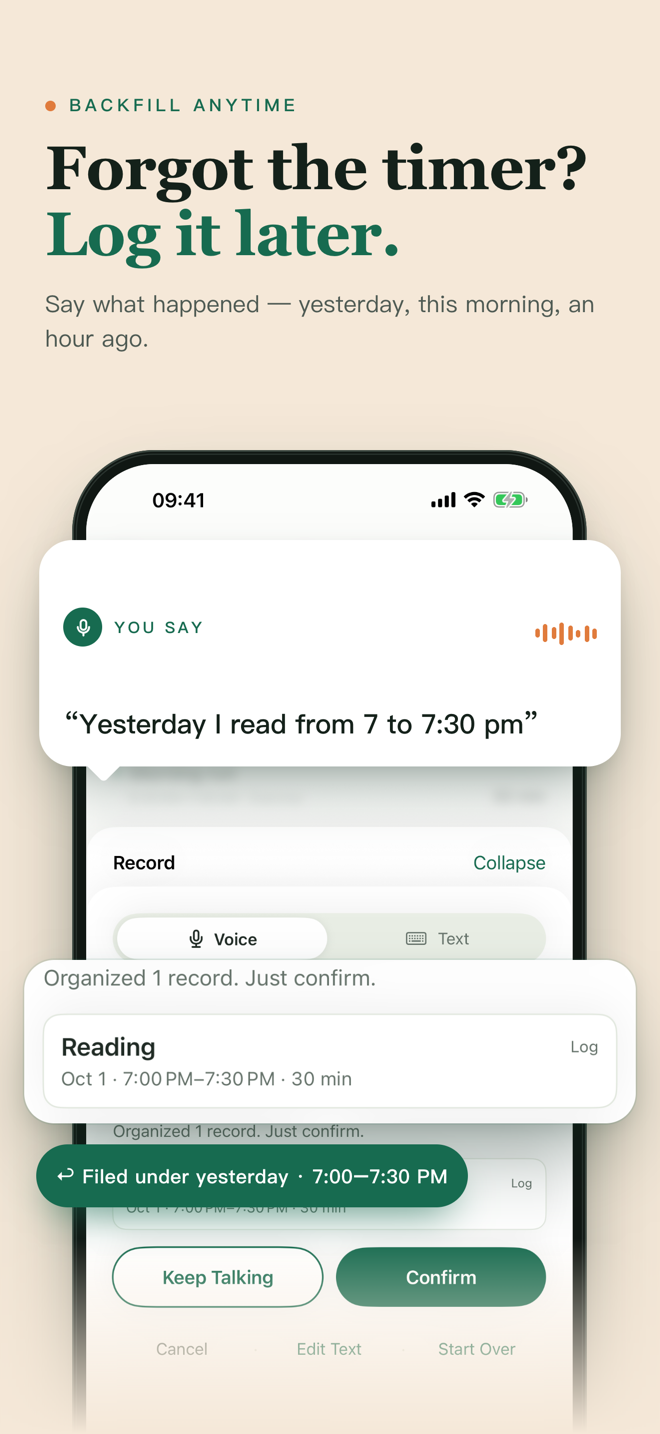
“Yesterday I read from 7 to 7:30 pm.”
Hourglean interprets the sentence and shows a proposal to confirm. Check that the record lands on yesterday, that the activity is reading, and that the interval is right. If the result is wrong, correct it before saving; do not assume every spoken phrasing will work.
You can also describe several activities in one sentence, such as “Ran for 30 minutes, then stretched for 10.” Check each proposed record separately. When timing is ambiguous, provide a date or a clearer time rather than relying on a guess.
5. Review gaps and overlaps
After saving, look at the surrounding records. Check for duplicated time, a wrong day, or a duration that does not match what you intended. Your record is a useful recollection, not an automatically verified timesheet.
If forgetting is frequent, try a smaller habit: record one important activity when it ends, and do a short evening review. You can start a timer by saying “Start reading,” but you do not have to start every activity with a timer. If speaking would disturb someone, use text entry.
When this approach is not enough
Reconstructed personal records are not a substitute for an employer's required timekeeping, client billing evidence, or a complete automatic activity log. Hourglean is designed for personal time awareness. It does not watch other apps, create invoices, or sync records across iPhone, Mac, and web.
Once you have a few records, use a three-day personal time check to see whether your categories answer a useful question. Read how pricing, voice processing, and local records work before downloading.
Full access for seven days from first download; Pro is then needed to add new records. Check your region's availability and price in the App Store.